What to Include in a Media Package for Journalists
A strong media package helps journalists understand, verify, and cover your story faster. This guide breaks down the assets to prepare, how to organize them, and what separates a pitch folder from a coverage-ready package.
Get featured on 500+ media outlets
Guaranteed placement, no PR experience needed.
A strong media package does more than make your brand look polished. It helps a journalist decide whether your story is credible, relevant, timely, and easy to cover before their deadline moves on.
For brands, startups, founders, nonprofits, creators, and agencies, that matters. Journalists receive more pitches than they can reasonably review. If your outreach forces them to ask for basic details, verify claims from scratch, hunt for images, or clarify who can speak on the record, you create friction. A well-built media package removes that friction.
This guide explains what to include in a media package for journalists, how to organize it, and what to leave out so your story is easier to evaluate and publish.
What is a media package?
A media package is a curated set of materials you send to journalists, editors, producers, or media outlets to support a specific story, announcement, campaign, launch, event, or expert pitch.
It usually includes the press release or story summary, company background, media assets, quotes, spokesperson details, proof points, and contact information. The goal is not to overwhelm the journalist. The goal is to give them everything they need to understand the story quickly and verify the parts they may want to use.
A media package is closely related to a press kit, but they are not always the same thing. A press kit is often more evergreen, covering your company, leadership, brand assets, and background. A media package is usually more campaign-specific. If you are building your foundational materials first, MediaBoost’s guide to what a press kit should include in 2026 is a useful companion resource.
It is also different from an advertising media kit, which is typically created by publishers to sell ad placements. In PR, a media package is built for earned media coverage.
What journalists actually need from your media package
Before you start adding files, think like a reporter. A journalist is not looking for a beautiful folder. They are looking for a story they can understand, evaluate, and support with credible material.
Your media package should answer five questions fast:
- What happened, and why does it matter now?
- Who is involved, and why are they credible?
- What facts, numbers, or evidence support the story?
- Who can comment or be interviewed?
- What assets can the outlet use without legal or quality issues?
If any of those answers are missing, your package may still look professional, but it will not be fully useful.
Media package checklist: the essential components
The best media packages are concise, organized, and easy to scan. Use this checklist as your starting point.
| Component | Purpose | Best format |
|---|---|---|
| Press release or story brief | Explains the news angle and key facts | PDF and editable document |
| Company fact sheet | Gives fast background and context | One-page PDF |
| Founder or spokesperson bio | Helps journalists identify credible voices | Short bio plus headshot |
| Quotes | Provides approved language for coverage | Document or within release |
| Media assets | Gives usable visuals and brand materials | Shared folder with clear file names |
| Data and proof points | Supports claims and adds substance | PDF, spreadsheet, or source notes |
| Contact details | Makes follow-up easy | Clearly visible in every key document |
| Usage rights notes | Clarifies what journalists can publish | Simple permissions statement |
You do not need every possible asset for every pitch. A funding announcement, product launch, executive hire, event invitation, and expert commentary pitch each require slightly different materials. The key is to include what helps the journalist cover the story, not everything your company has ever produced.
1. A clear press release or story brief
For many media packages, the press release is the central document. It should communicate the news, explain its relevance, and provide enough detail for a journalist to decide whether the story fits their beat.
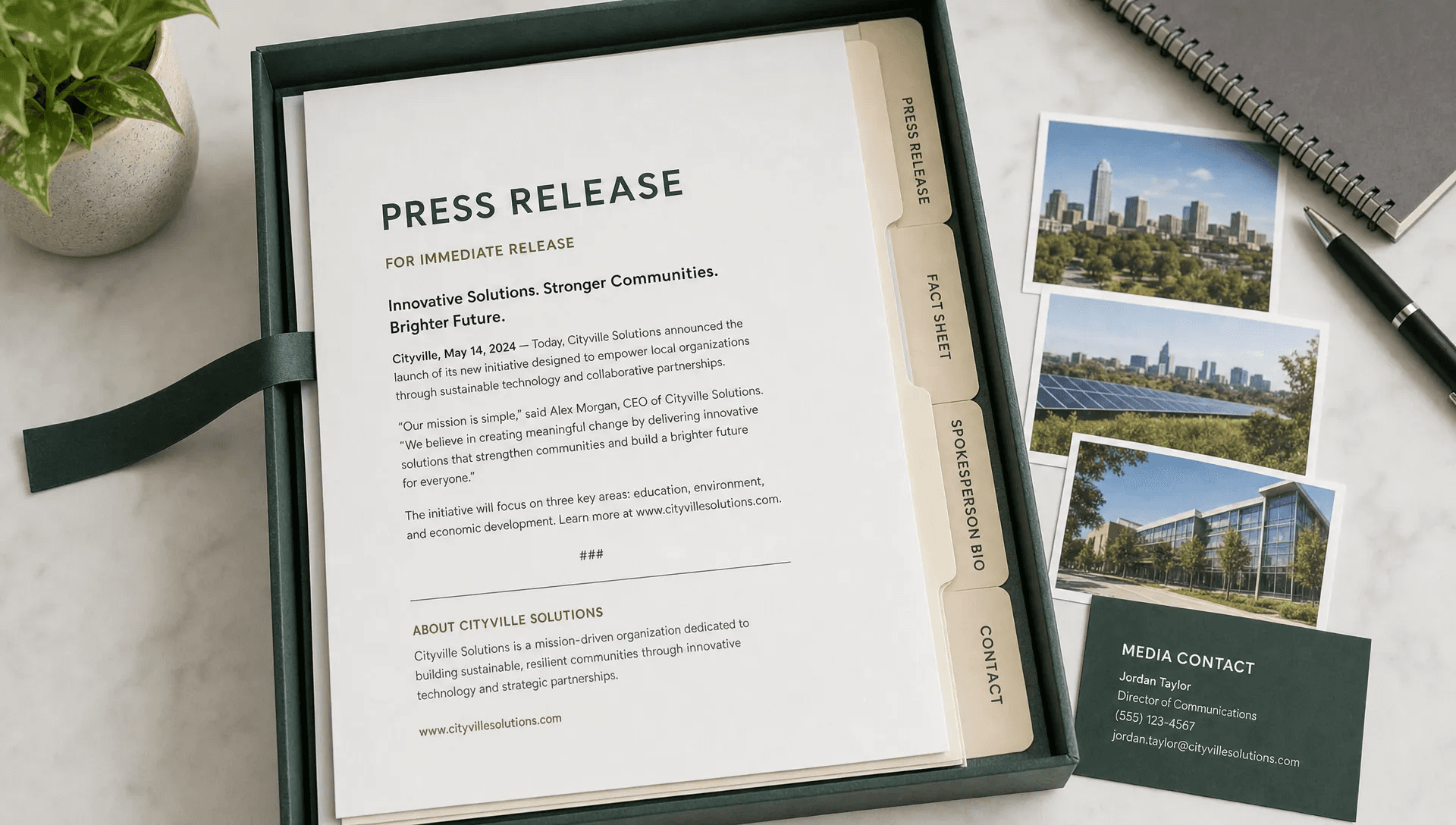
A media-friendly press release should include:
- A specific headline that says what happened
- A short lead paragraph covering the who, what, when, where, why, and how
- Supporting details in order of importance
- One or two strong quotes from relevant people
- A brief company boilerplate
- Clear media contact information
If your announcement is not big enough for a formal release, create a one-page story brief instead. This can work well for expert commentary, trend analysis, local business stories, nonprofit initiatives, or creator-led campaigns.
The mistake to avoid is turning your release into a sales page. Journalists are not looking for slogans, exaggerated claims, or vague language like “game-changing” and “revolutionary” unless the facts genuinely support it. If you need help shaping the release itself, follow a structure designed for a media-friendly press release rather than a promotional brochure.
2. A short company fact sheet
A fact sheet gives journalists fast context without forcing them to search your website. Keep it to one page whenever possible.
Include the essentials: company name, founding year, headquarters or operating region, leadership, industry, customer segment, notable milestones, mission, website, and relevant statistics. If your company operates in a regulated or technical industry, add a simple explanation of what you do in plain English.
A strong fact sheet is especially helpful when your announcement contains unfamiliar terminology. For example, a B2B SaaS company, fintech startup, health tech platform, or manufacturing business may need to explain the market problem before the announcement makes sense.
The fact sheet should be factual, not inflated. Avoid unverified claims like “the leading provider” unless you can back them up. A journalist may repeat your wording only if it is specific, attributable, and defensible.
3. Spokesperson bios and headshots
Journalists need to know who is available to comment and why that person is qualified. Your media package should include short bios for founders, executives, subject-matter experts, creators, researchers, or community leaders connected to the story.
For each spokesperson, include their title, relevant experience, areas of expertise, and interview availability if appropriate. Keep the bio tight. A journalist usually does not need a full resume.
Pair each bio with a high-resolution headshot. Use professional images with neutral backgrounds when possible. Make sure file names are clear, such as jane-smith-ceo-headshot.jpg, rather than IMG_4829.jpg.
If multiple people are available, identify the best person for each topic. For example, the CEO may be best for company strategy, while the CTO may be better for technical questions and the customer success lead may be better for user impact.
4. Approved quotes that sound human
Quotes are often the weakest part of a media package because they sound like committee-approved marketing copy. A good quote adds interpretation, emotion, or perspective that the rest of the release cannot provide.
A strong media quote should do at least one of these things:
- Explain why the news matters beyond the company
- Add a human perspective or founder insight
- Connect the announcement to a larger industry trend
- Clarify the problem being solved
- Offer a concise opinion a journalist can use
Avoid quotes that simply repeat the headline. “We are excited to announce our new product” adds little value. Instead, explain what changed, why now, and who benefits.
If you are including outreach notes, interview requests, or formal letters to partners as part of a larger PR workflow, tools like an AI-powered professional letter generator can help draft polished written communications faster. Still, review every quote and pitch manually so it sounds like a real person, not a template.
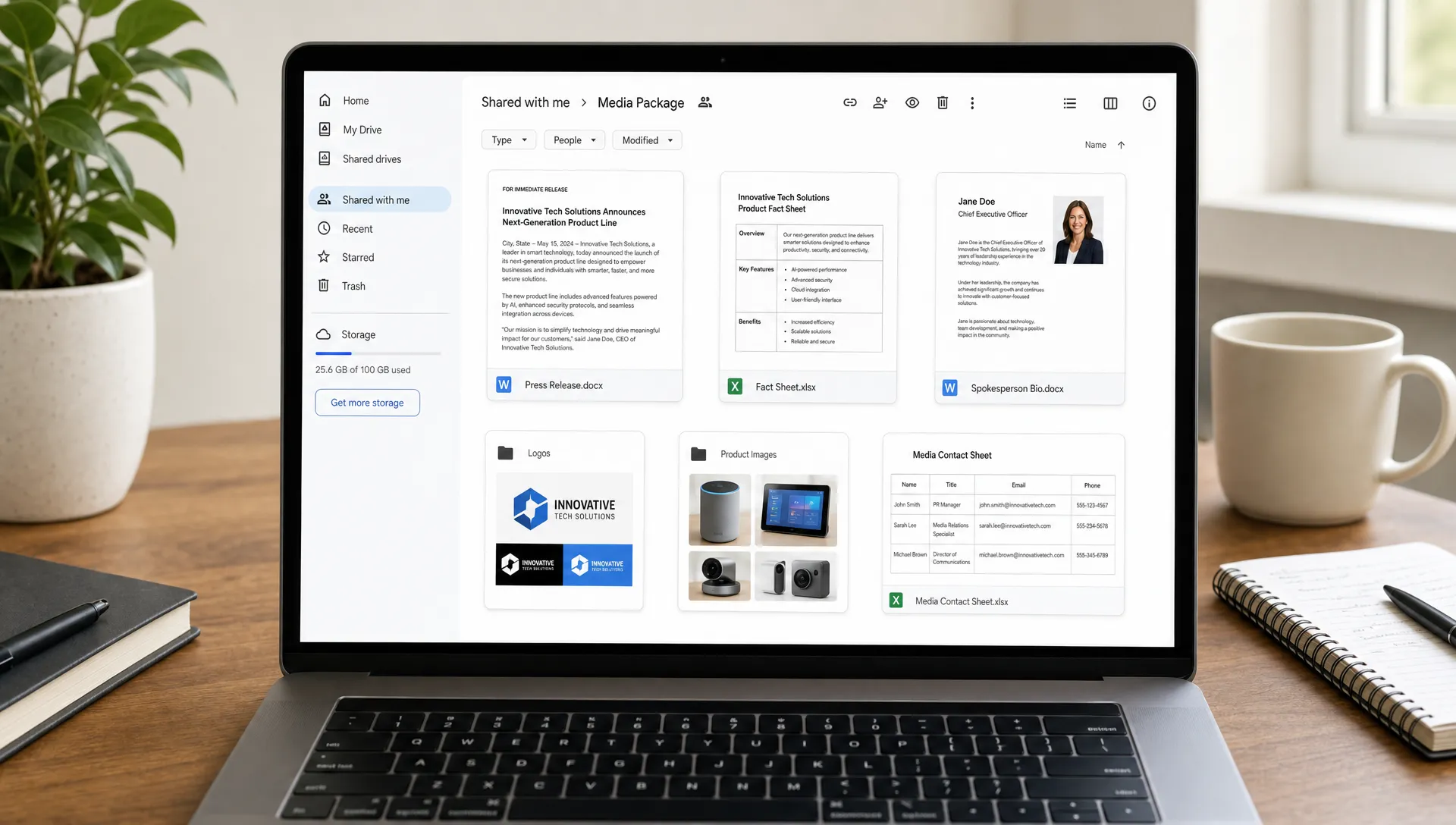
5. High-quality media assets
Visual assets can make the difference between a story that gets passed over and one that gets published with strong presentation. Journalists and editors need images that are easy to access, properly labeled, and safe to use.
Your media package may include product images, executive headshots, event photos, logos, screenshots, infographics, office or team photos, and short b-roll clips if relevant. Only include assets that support the story.
For each visual asset, provide basic usage guidance. If journalists are allowed to use the images for editorial coverage, say so clearly. If photo credit is required, include the exact credit line. If an image cannot be cropped, edited, or used in certain contexts, explain that upfront.
Quality matters, but convenience matters too. Offer high-resolution versions for publication and smaller preview versions for quick review. Avoid sending huge attachments that clog inboxes. A shared folder is usually better.
6. Proof points, data, and supporting evidence
Journalists are trained to verify. If your media package includes claims, rankings, growth numbers, customer outcomes, survey results, funding figures, or market observations, provide supporting material.
This does not mean you need to reveal confidential information. It means you should make your public claims easier to trust.
Useful proof points can include customer numbers, survey methodology, third-party research references, case study summaries, independent certifications, investor or partner information, award details, product benchmarks, or links to public records. If you mention a statistic, explain where it came from and what it measures.
Be careful with selective data. “300 percent growth” may sound impressive, but it raises questions if the baseline is tiny or the time period is unclear. “Revenue grew 300 percent year over year from 2025 to 2026” is more useful than a vague growth claim.
A simple proof table can help journalists scan your claims quickly.
| Claim type | Weak version | Stronger version |
|---|---|---|
| Growth | “We grew rapidly” | “Customer accounts grew from 2,000 to 8,500 in 12 months” |
| Market relevance | “This is a major trend” | “The release connects to increased demand for X among Y audience” |
| Product impact | “Users save time” | “Beta users reported reducing the task from 3 hours to 45 minutes” |
| Credibility | “Trusted by top brands” | “Used by companies in healthcare, retail, and finance, with named examples if approved” |
The more specific and verifiable your support is, the more useful your media package becomes.
7. Customer stories, testimonials, or case studies
If your announcement affects real customers, communities, partners, or users, include a short case study or testimonial with permission. Journalists often need more than a company’s internal perspective. They may want to understand how the news affects people outside the organization.
A good customer story includes the problem, why the customer chose your solution, what changed, and whether the customer is available for comment. If the person or company cannot be contacted, make that clear. Do not imply interview availability without permission.
For sensitive industries, anonymized examples may be acceptable, but they are usually less compelling than named stories. If you use anonymized stories, explain why they are anonymized and keep the claims modest.
8. Contact information that is impossible to miss
This sounds obvious, but many media packages make contact details hard to find. Put your media contact in the press release, fact sheet, email pitch, and shared folder notes.
Include the contact’s name, role, email address, phone number if appropriate, time zone, and response expectations. If you have a PR agency or outside representative, clarify whether journalists should contact the agency or the company directly.
For deadline-driven stories, response speed matters. If you pitch a journalist and then take two days to answer basic follow-up questions, you may lose the opportunity even if the story is strong.
9. A concise pitch or cover note
Your media package still needs a short pitch. The package contains the materials, but the pitch explains why the journalist should open them.
Keep the note brief and specific. Mention the news angle, why it fits the journalist’s audience, what assets are included, and who is available for comment. Personalization matters, but do not overdo it. One relevant sentence about their beat is usually better than forced flattery.
Here is a simple structure:
| Pitch element | What to say |
|---|---|
| Opening | State the story in one sentence |
| Relevance | Explain why it matters to their readers |
| Support | Mention the data, spokesperson, or assets included |
| Offer | Offer an interview, quote, images, or additional context |
| Close | Provide clear contact details and timing |
Do not attach ten files to the first email unless requested. Link to a clean folder instead, and make sure the link works for people outside your organization.
10. Clear organization and file naming
A messy media package creates unnecessary work. Organize your materials so a journalist can find the most important items in seconds.
Use simple folder names such as:
- 01 Press Release
- 02 Fact Sheet
- 03 Media Assets
- 04 Spokesperson Bios
- 05 Data and Supporting Materials
- 06 Contact and Usage Rights
Clear naming helps too. Replace vague file names with descriptive ones like company-name-product-launch-press-release.pdf, company-name-logo-dark-background.png, or founder-name-short-bio.pdf.
Before sending, test the folder as if you were an outside journalist. Open it in an incognito browser or send it to someone outside your team. Confirm that permissions work, files load, and documents are not accidentally restricted.
What not to include in a media package
A media package should be complete, but not bloated. More files do not automatically create more credibility. In fact, too much material can make the story harder to evaluate.
Avoid including unrelated sales decks, outdated logos, private financial details, internal strategy documents, low-resolution screenshots, unapproved testimonials, password-protected files without instructions, and long biographies that read like resumes.
Also avoid jargon-heavy explainers unless the journalist covers a highly technical beat. Even then, pair technical detail with plain-language context. The best media packages make complex stories easier to understand, not harder.
How to tailor your media package by story type
Different announcements need different supporting materials. A product launch may require screenshots, product images, demo access, and customer quotes. A funding announcement may need investor quotes, company traction, founder bios, and market context. An event announcement should include dates, location, speaker details, registration information, images, and credential instructions.
A crisis response or correction requires extra care. In that case, clarity, accuracy, and approval matter more than promotional framing. Include a statement, timeline of known facts, spokesperson availability, and instructions for follow-up.
For startups without a dedicated PR department, the package does not need to be complicated. It just needs to be accurate, relevant, and easy to use. MediaBoost’s guide on how startups can break into media without a PR team offers additional context for lean teams building press outreach from scratch.
How your media package supports distribution
A media package is useful for direct journalist outreach, but it also supports broader press release distribution. When your release is submitted to outlets, syndicated across media networks, or reviewed by editorial teams, organized assets and accurate information reduce delays and inconsistencies.
This is especially important if your goal is not only publicity, but also credibility, search visibility, and discoverability in AI-generated answers. Consistent company descriptions, clear proof points, and live media placements can strengthen your brand’s public footprint.
If you are preparing a formal announcement, you can also review where to send and submit a press release so your package is matched with the right distribution path.
Quick media package quality check before sending
Before you send your media package, do one final review. Ask whether a journalist could understand the story in under two minutes, verify the main claims, identify the right spokesperson, use the visuals legally, and contact you without searching.
If the answer is yes, your package is likely ready. If not, simplify. Remove anything that does not support the story, strengthen weak proof points, and make the most important files easier to find.
A good media package feels generous, not overwhelming. It respects the journalist’s time while giving them enough substance to decide whether your story deserves coverage.
Frequently Asked Questions
What is the difference between a media package and a press kit? A press kit is often an evergreen collection of company information, brand assets, bios, and background materials. A media package is usually built around a specific announcement, campaign, event, launch, or pitch.
How long should a media package be? The core written materials should be concise. A press release is typically one to two pages, a fact sheet is often one page, and bios should be short. Visual assets can live in a shared folder, but only include files that support the story.
Should I send a media package as attachments or a link? A link to a clearly organized folder is usually better than multiple large attachments. You can attach the press release if appropriate, but make sure any folder link has the correct permissions before sending.
Do journalists need logos and brand guidelines? They often need logos, images, and basic usage rights, especially for online coverage. Full brand guidelines are usually unnecessary unless the outlet specifically requests them.
Can a media package help with SEO? Indirectly, yes. A strong media package can support better, more accurate coverage, and coverage from reputable outlets can contribute to brand visibility, referral traffic, credibility, and a stronger search footprint.
Turn your media package into real media visibility
Building the right materials is the first step. Getting them reviewed, submitted, and published across credible outlets is where visibility starts to compound.
MediaBoost helps brands distribute press releases and secure placements across 500+ trusted publications, with guaranteed submissions, live links, editorial review, and proof reports. If you want your media package to support stronger credibility, SEO value, and AI search visibility, explore MediaBoost’s press release distribution services and prepare your next announcement for wider reach.